
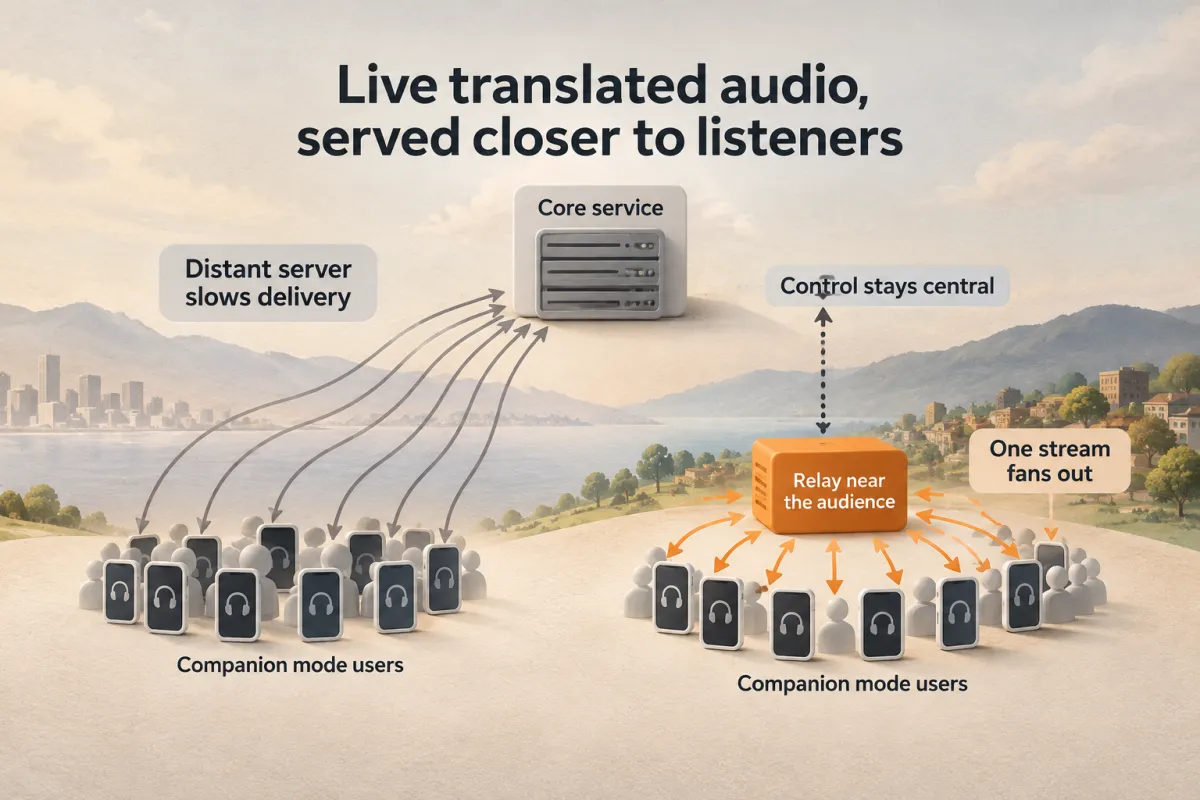
Salam Relay runs on a server near your audience, takes one copy of Companion’s live translated audio and fans it out to many phones, while captions and control stay on Salam.
Live translation audio streaming for events works best when the audio stays close to the speaker. In SalamAI Companion, every phone in the venue pulls its own low-latency stream of the live translation. One central server can only feed so many phones, and when the audience sits far from that server, each audio part takes longer to arrive.
Salam Relay, recently introduced in SalamAI, moves audio delivery onto a small server near the audience while control stays on Salam. Here is how it works.
Why live translated audio needs to fan out
A Companion listener scans a QR code, puts on headphones and hears the live translation on their own phone, in their language, with live subtitles. Each phone pulls an LL-HLS stream made of parts a fraction of a second long, requesting the next part before it exists so it arrives the moment it is ready.
Every phone is a separate stream. A synthetic load test with 300 simulated phones and two languages passed every check and showed the first ceiling: the media server, at roughly 550 to 600 phones for two languages on the current machine. Conferences, places of worship and large halls can need more.
The design rule was no audible extra delay. A managed streaming product measured 13 to 15 seconds behind live, too far for interpretation, and a promising serverless edge prototype ran audio through a third-party metered platform. So Salam built its own relay: a small program near the audience that takes one copy of the stream and fans it out to many phones, keeping that traffic local.
Control stays on Salam, audio moves closer
Sign-in, admitting listeners, captions, attendance and relay assignment stay on Salam. The relay only carries audio. It holds no customer data, accounts or recordings, keeps the last few seconds of audio in memory, and writes nothing to disk except its own identity key.
Take an illustrative case: an organiser in Singapore expects a multilingual audience far from Salam’s main server. Their platform admin opens Platform → Relays → Add a relay, names it “Singapore” and receives a one-time code and a single copy-paste command. On a recent Debian or Ubuntu cloud VM, that command downloads the relay from Salam, verifies its checksum and installs it as a background service, with no Docker and no inbound firewall ports.
The relay prints a fingerprint. The admin checks it against the one on screen, much like a Bluetooth pairing code, then clicks Accept with their password. The console creates the secure tunnel and web address automatically, and the Relays page shows the tunnel moving from Creating to Ready, with phones, bandwidth, lag and plain-language problem messages.
How a phone is assigned and what happens when a relay fails
Phones already check in with Salam every few seconds. With relays on, Salam can reply “get your audio from this relay”, choosing one that is accepted, healthy for that stream, not being drained, under its limits and least loaded. Assignment is sticky, and atomic reservations stop a rush of joining phones from pushing a relay past its limit. Captions keep flowing from Salam throughout.
Salam does not take a relay’s word that it is fine. It probes each relay through its public address, as a phone would, checking that the playlist and newest audio part are fresh.
If a relay errors, stalls for 10 seconds or refuses the phone, the phone retries once and reports the failure straight away. Salam replies with another relay or direct audio. In a local test, the switch left a gap of 0.5 to 1.3 seconds, with mode, volume and captions kept and only one player, so no double audio.
Back at the Singapore event, suppose the technician must replace the relay box mid-session. They choose Drain: new phones go elsewhere while current listeners keep hearing audio. If relays are switched off entirely, direct seats are bounded to protect the main server, and anyone over the limit keeps captions until a seat frees.
Privacy, measured results and what comes next
- No transcripts, names or accounts pass through a relay, and high-privacy sessions, such as care lines, are never relayed.
- Each relay generates its own identity key; messages are signed and cannot be replayed.
- Short-lived permissions mean a stolen relay loses access within seconds.
- Changes need a platform admin with two-factor sign-in plus their password, and are audit logged.
Local tests used the real relay program with synthetic audio. The relay added 0 parts of delay at the 90th percentile compared with fetching directly from Salam. Twenty phones through one relay ran with 0 errors, using about 11% of one CPU core and roughly 17 MB of memory. Deleting an event link stopped relay audio in 0.14 seconds.
Next come the Singapore VM test, a locked iPhone through that relay, larger load tests per relay, and venue boxes in the hall so local phones barely touch the internet, easing bandwidth on the main server.