Banking and insurance
Find policies, research regulations and review claims information. Check the source of an answer and control which models staff can use.

An Ordinexis product
Your company brain, with AI built in.
iKB is enterprise AI infrastructure for business teams. Connect your company files, AI models and business tools in one place. Staff get answers with sources, analyse data and prepare reports in minutes. You control who sees what, and every action is on record. Winner of Gold in the Artificial Intelligence category at the Internet Alliance Tech Industry Awards 2026 (Internet Alliance Malaysia, March 2026).
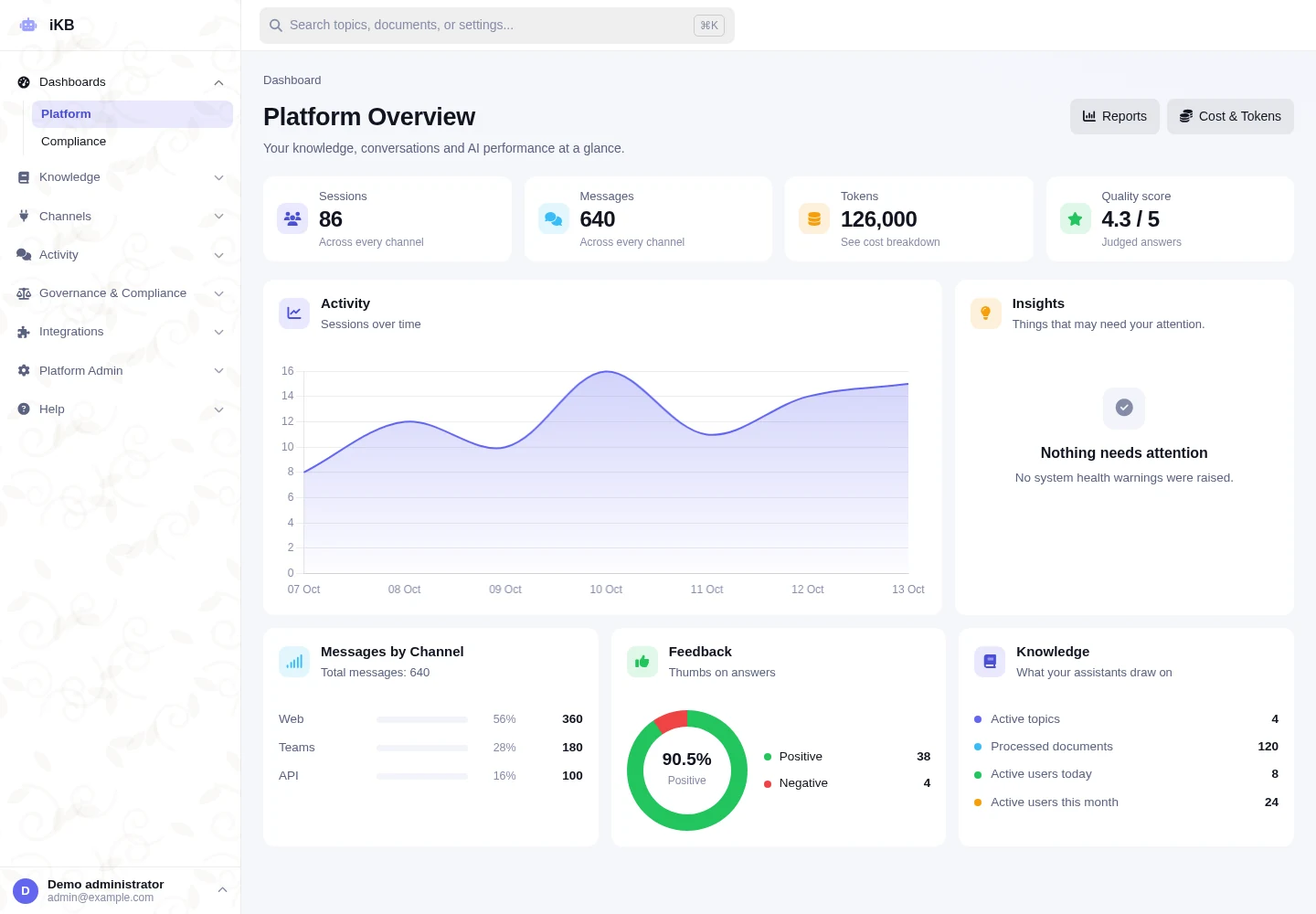
Inside the platform
The NEO2 console shows activity, channel usage, cost and AI quality at a glance. Organise the approved information your AI assistants use across the business.
Enterprise AI Infrastructure
iKB brings data, AI tools, access rules and delivery channels together. Your team decides who can use them and how the work is reviewed.
Discuss your setupDocuments, databases, storage and websites.
Models, search, research, data analysis and approved tools.
Permissions, tests, usage and records.
Web, workspaces, Teams, Slack and API.
Where it helps
Give teams access to shared AI tools and approved information. Manage the models, connections and access rules together.
Find policies, research regulations and review claims information. Check the source of an answer and control which models staff can use.
Help staff and public-service teams find acts, circulars, procedures and purchasing rules. Choose access and hosting settings that suit sensitive information.
Research regulations and review contracts, standards and board papers. Keep the source documents and records needed for a review.
Help staff use safety procedures, maintenance documents and quality manuals. Analyse business data, prepare reports and connect approved tools.
What it does
Available features depend on your models, permissions, connected services and setup. We confirm the requirements with your team.
Choose which AI models staff can use, including supported models on your own servers. Manage provider connections, default model selection, pricing and gateway settings in one console.
Connect approved business tools through MCP or REST interfaces. MCP is a standard for connecting AI to tools; REST is a common way to connect software. Set rules for external access and review action records. Reusable skills guide response formats while keeping system and safety rules in place.
Bring in documents, storage, databases, websites, and business systems while preserving source information.
Ask questions about spreadsheets. iKB checks and runs SQL data queries in an isolated environment, keeping different currencies and units separate. Prepare research with source references and create Word, PowerPoint, Excel or PDF files.
Add information in two languages and search across Malay, Chinese and Tamil content. Ask questions about several files, keep topic wikis and create charts or other outputs in chat. Access and review controls still apply.
Combine keyword and meaning-based search to find relevant information. Exact-phrase search, result ranking and GraphRAG, which uses links between information, help find a clause or fact. Check that the source supports the answer.
Apply access rules, saved prompt versions, content checks and model policies before answers reach users. Set rules for hiding sensitive details and keeping or deleting records.
Use web chat, workspaces, Slack, Teams, WhatsApp, Telegram, API, voice, and generated Word, PowerPoint, Excel, or PDF files.
Review sources, model use, rule checks, system changes, costs and exported files. Audit records help show what happened.
How it works
Set up each step, test it and review the results.
Documents, storage, databases, websites, and APIs.
Choose the models, search method, tools and channels your team needs.
Set rules for access, safety, AI models, sensitive details and record storage.
Provide answers, analysis or approved actions. Review the sources, action records and usage.
Deployment and controls
Choose hosted service, private cloud or your own servers. Fully air-gapped setups, kept separate from external networks, are also available.
Use cloud AI models or supported local models with an OpenAI-compatible connection. Choose models by topic and your organisation's rules.
Hide personal information in text and images. Use data loss prevention (DLP) controls, record storage rules and processes for permanent deletion.
Keep audit events as new entries that do not overwrite earlier ones. Export encrypted evidence and review model use, token use and costs. Tokens are the units AI providers use to measure text processing.
Before you decide
Answers about uses, testing, setup and cost.
iKB is enterprise AI infrastructure. It combines company data, model controls, search, analysis and approved tools. A knowledge base or chatbot is one part of that system. For example, staff can ask a policy question, check its source and prepare a report using the same platform.
Yes. iKB offers hosted, private-cloud, on-premise and air-gapped options. On-premise means your own servers. Air-gapped means a network kept separate from external networks. The models and connected services determine which data stays inside your environment. Confirm the full setup before choosing a plan.
iKB pricing is based on your data, users, connected systems, hosting and support needs. No fixed subscription price is published here. Ask for a quote and a small pilot. Use sample documents and real questions to test answers, sources and access rules before wider use.
From the blog

 Ordinexis
Ask iKB a plain-language question, get a chart computed by read-only SQL, pin it to a live dashboard and inspect how every number was produced.
Read article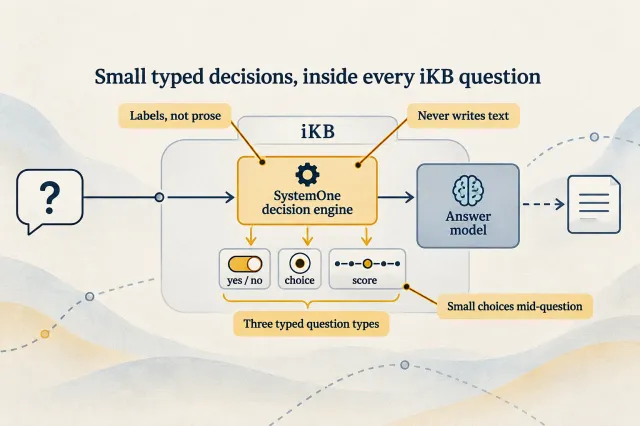 Ordinexis
iKB uses SystemOne decision models such as Jev and Clef, plus OpenAI Decisions, to judge evidence and make small classification choices mid-question, with shadow mode, fallbacks and usage records.
Read article Ordinexis
iKB’s team rebuilt Deep Research after finding the first version produced summaries, not research. The redesigned AI deep research agent plans sub-questions, reads full sources, checks every quote and reports its own gaps.
Read articleDemo, pricing or project advice
Tell us the task and who will use it. We will show you a demo, explain the setup and give you a price.
Get a brochure or request a demo.
Choose a product PDF and tell us if you would like to speak with our team.